
FIREFOX IS BRINGING FREE VPN PROTECTION TO ANDROID
Android users who browse with Firefox are getting a new privacy feature that could make everyday web browsing more private.
Mozilla is gradually rolling out a free built-in VPN feature for Firefox on Android. Eligible users can use up to 50GB of VPN-protected browsing every month without paying for a separate subscription.
The feature is designed to make IP protection easier to access by putting the controls directly inside the Firefox browser.
THE FEATURE IS STILL ROLLING OUT
Not every Firefox Android user will see the VPN option immediately.
Mozilla says the feature is being introduced through a progressive rollout, meaning availability depends on whether the feature has reached a particular account or device.
Mozilla's current support information lists selected countries where the Android feature is available, including South Africa, the United Kingdom, the United States, Japan, Malaysia and several European countries. Kenya is not currently included in Mozilla's published availability list, so users in Kenya may not see the option yet.
HOW MUCH DATA DO YOU GET?
The free feature comes with a 50GB monthly limit.
For ordinary activities such as reading websites, online shopping and general browsing, that can provide a substantial amount of protected browsing.
However, users who frequently stream video or consume large amounts of data could reach the limit much faster.
Once the 50GB allowance is used, Firefox pauses the VPN protection until the beginning of the next calendar month.
HOW TO TURN ON FIREFOX'S BUILT-IN VPN
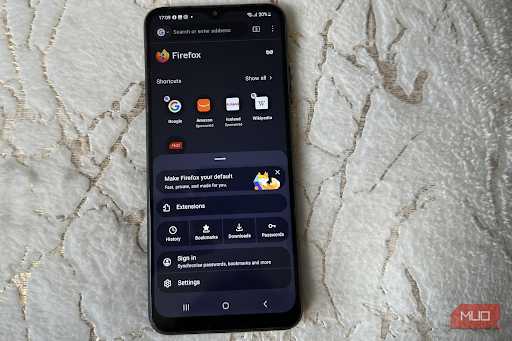
If the feature is available on your Android device, Mozilla provides a simple setup process.
1. Open Firefox on your Android phone.
2. Tap the three-dot menu.
3. Open Settings.
4. Scroll down and select VPN.
5. Tap the toggle next to the VPN option.
6. If prompted, sign in with a Mozilla account.
7. Select the recommended connection or an available location if location selection is offered.
8. Return to browsing and check that the VPN is active.
Mozilla says the Recommended option can automatically select the fastest available location for the connection.
IT DOESN'T PROTECT EVERY APP ON YOUR PHONE
This is one of the most important things Android users need to understand.
Firefox's built-in VPN does not create a VPN connection for the entire smartphone.
It protects traffic originating from Firefox.
Other applications such as messaging apps, other browsers and other internet-connected services on the phone are not covered by this feature.
That makes it different from Mozilla VPN, which is a separate service designed to provide protection across the device.
WHAT DOES THE FIREFOX VPN ACTUALLY DO?
Mozilla says the feature routes Firefox traffic through a secure proxy and masks the user's IP address.
This means websites can see the proxy's IP address rather than the user's normal IP address.
The feature therefore adds another privacy layer when browsing through Firefox, particularly when using networks where users want additional protection.
However, users should not interpret this as making them completely anonymous online.
A VPN or proxy is only one part of online privacy, and websites can still use other technologies to identify or track users.
WHY THE 50GB LIMIT MATTERS
For casual browsing, 50GB can be plenty.
Reading news, checking websites, shopping online and similar activities generally use much less data than high-resolution video streaming.
But video and other data-heavy activities can consume bandwidth quickly.
Once the monthly allowance is exhausted, Firefox pauses VPN protection until the next monthly reset.
A BETTER ALTERNATIVE TO RANDOM FREE VPN APPS?
Mozilla's built-in option also gives users an alternative to downloading unknown VPN applications.
Instead of installing another app, eligible Firefox users can activate the feature directly inside the browser.
That can make the setup simpler and avoids having to manage another application.
However, users should still understand exactly what the feature protects before relying on it.
THE FREE FEATURE IS DIFFERENT FROM MOZILLA VPN
Mozilla offers two different products that can easily be confused.
Firefox's built-in VPN is free and limited to Firefox traffic, with a 50GB monthly allowance.
Mozilla VPN is a separate subscription service that provides device-wide protection and unlimited usage.
The choice therefore depends on how much protection and data coverage a user needs.
FIREFOX IS MAKING PRIVACY EASIER TO ACCESS
The bigger idea behind the feature is simplicity.
Instead of asking users to install a separate application and configure complicated settings, Mozilla has placed the privacy control directly inside Firefox.
With a single toggle, eligible users can add IP masking to their Firefox browsing.
Mozilla says the feature is intended to provide practical privacy protection for everyday activities such as browsing, shopping and using public Wi-Fi.
WHAT HAPPENS WHEN YOU REACH 50GB?
Firefox will notify users as they approach the monthly limit.
After the allowance is exhausted, VPN protection is paused.
The data allowance resets at the beginning of the next calendar month.
This means users should not assume the VPN will remain active indefinitely simply because the feature itself is free.
THE BOTTOM LINE
Mozilla is bringing a free built-in VPN feature to Firefox on Android, giving eligible users 50GB of protected browsing each month.
The feature masks the user's IP address and routes Firefox traffic through a secure proxy.
But it is not a full-device VPN.
Other apps and browsers on the Android phone remain outside its protection.
For people who mainly want an easy privacy boost while browsing with Firefox, the feature offers a simple option. For users who need protection across their entire device or unlimited VPN usage, Mozilla's separate VPN service is designed for that purpose.
The biggest thing to remember is simple: Firefox's free VPN protects your Firefox browsing — not everything you do on your phone.